


애널라이저란?
문자열을 토큰으로 변환시켜주는 장치
POST /products/_create/1
{
"name": "Apple 2025 맥북 에어 13 M4 10코어"
}
POST /products/_create/2
{
"name": "Apple 2024 에어팟 4세대"
}
POST /products/_create/3
{
"name": "Apple 2024 아이패드 mini A17 Pro"
}
JSON
복사
토큰(token) | 도큐먼트 id |
Apple | [1, 2, 3] |
2025 | [1] |
맥북 | [1] |
에어 | [1] |
13 | [1] |
M4 | [1] |
10코어 | [1] |
2024 | [2, 3] |
에어팟 | [2] |
4세대 | [2] |
아이패드 | [3] |
mini | [3] |
A17 | [3] |
Pro | [3] |
문자열을 자를때 단어 단위로 자르는게 아니라 애널라이저가 여러가지의 작업을 거쳐 토큰으로 만듭니다.
캐릭터 필터
문자열을 토큰으로 자르기 전에 문자열을 다듬는 역할
•
html_strip (HTML 태그를 제거)
◦
<h1>아이폰 15 사용 후기</h1> → 아이폰 15 사용 후기
토크나이저
문자열을 토큰으로 자르는 역할
[예시]
•
standard 토크나이저 (공백 또는 ,, ., !, ?와 같은 문장 부호를 기준으로 자름)
The Brown-Foxes jumped over the roof.
→ [The, Brown, Foxes, jumped, over, the, roof]
토큰 필터
토큰 필터(token filter)는 잘린 토큰을 최종적으로 다듬는 역할
[예시]
1.
lowercase 필터 적용 (소문자로 변환)
[The, Brown, Foxes, jumped, over, the, roof]
→ [the, brown, foxes, jumped, over, the, roof]
2.
stop 필터 적용 (a, the, is와 같은 특별한 의미를 가지지 않는 단어 제거)
[the, brown, foxes, jumped, over, the, roof]
→ [brown, foxes, jumped, roof]
3.
stemmer 필터 적용 (단어의 원래 형태로 변환)
[brown, foxes, jumped, roof]
→ [brown, fox, jump, roof]
사용방법
애널라이저가 토큰을 어떻게 나누는지 확인하는 명령어
// 방법 1
GET /_analyze
{
"text": "_________",
"analyzer": "standard"
}
// 방법 2 (standard analyer의 구성을 직접 명시)
GET /_analyze
{
"text": "_________",
"char_filter": [],
"tokenizer": "standard",
"filter": ["lowercase"]
}
JSON
복사
Custom Analyzer
// 인덱스 생성 + 매핑 정의 + Custom Analyzer 적용
PUT /products
{
"settings": {
"analysis": {
"analyzer": {
"products_name_analyzer": {
"char_filter": [],
"tokenizer": "standard",
"filter": []
}
}
}
},
"mappings": {
"properties": {
"name": {
"type": "text",
"analyzer": "products_name_analyzer"
}
}
}
}
// 데이터 삽입하기
POST /products/_create/1
{
"name": "Apple 2025 맥북 에어 13 M4 10코어"
}
// 검색하기
GET /products/_search
{
"query": {
"match": {
"name": "apple"
}
}
}
GET /products/_search
{
"query": {
"match": {
"name": "Apple" // --> "filter": []로 커스텀하게 적용안해서 대문자로만 검색가능
}
}
}
JSON
복사
analyzer 토큰화 & 검색 방법
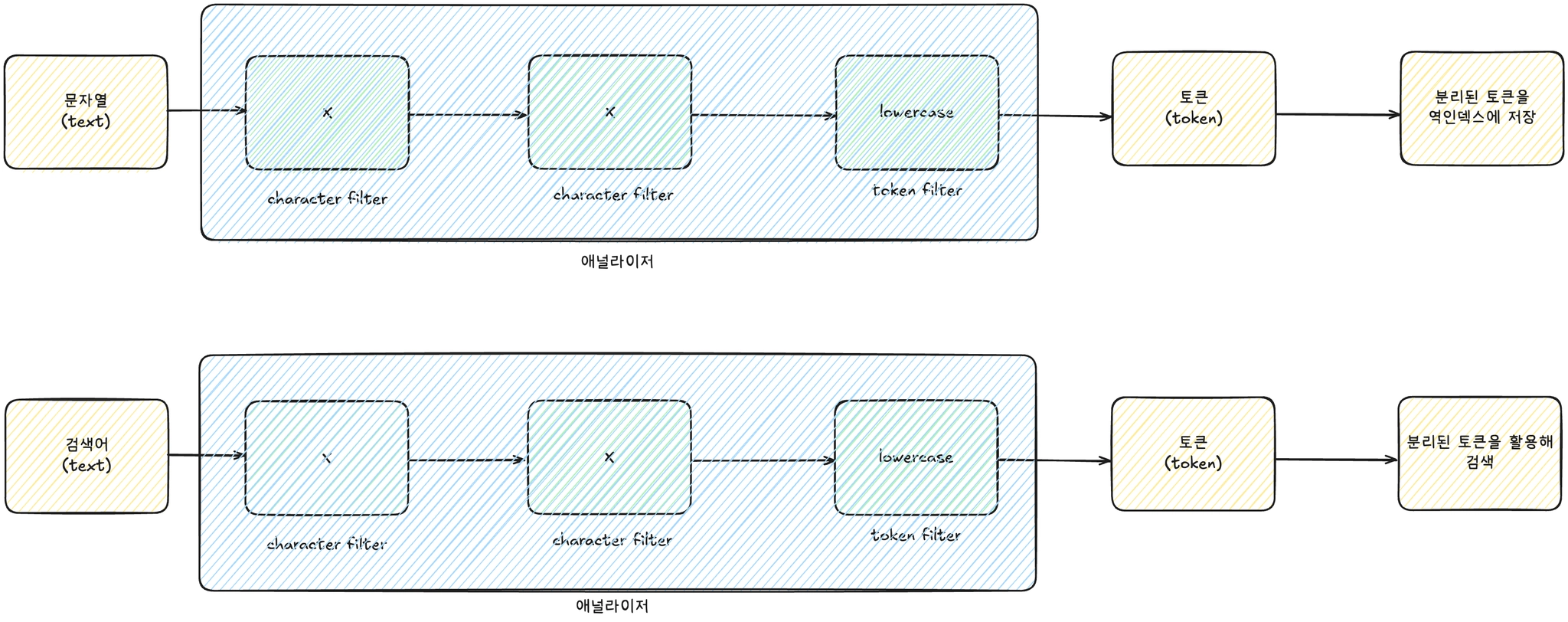
도큐먼트를 생성할 때 Analyzer가 문자열을 토큰으로 분리해 역인덱스를 생성한다. 그런데 검색을 할 때도 Analyzer가 검색어로 입력한 문자열을 토큰으로 분리해 검색합니다.
이 때문에 Apple이라고 검색어를 입력하더라도 lowercase token filter에 의해 apple로 바뀐 채로 검색을 하게 됩니다. 그래서 Apple이라고 검색했는데도 불구하고 도큐먼트가 조회된 것입니다.
HTML 태그 제거하기
•
HTML 태그가 포함된 데이터를 검색에 사용할 때는 character filter로 html_strip 적용
PUT /boards
{
"settings": {
"analysis": {
"analyzer": {
"boards_content_analyzer": {
"char_filter": ["html_strip"],
"tokenizer": "standard",
"filter": ["lowercase"]
}
}
}
},
"mappings": {
"properties": {
"content": {
"type": "text",
"analyzer": "boards_content_analyzer"
}
}
}
}
// 데이터 삽입하기
POST /boards/_doc
{
"content": "<h1>Running cats, jumping quickly — over the lazy dogs!</h1>"
}
// 검색하기
GET /boards/_search
{
"query": {
"match": {
"content": "running"
}
}
}
GET /boards/_search
{
"query": {
"match": {
"content": "h1"
}
}
}
// Analyze API 사용하기
GET /boards/_analyze
{
"field": "content",
"text": "<h1>Running cats, jumping quickly — over the lazy dogs!</h1>"
}
JSON
복사
불용어(a, an, the, or, but) 제거하기 (stop)
•
의미없는 불용어 제거
// 인덱스 생성 + 매핑 정의 + Custom Analyzer 적용
PUT /boards
{
"settings": {
"analysis": {
"analyzer": {
"boards_content_analyzer": {
"char_filter": [],
"tokenizer": "standard",
"filter": ["lowercase", "stop"]
}
}
}
},
"mappings": {
"properties": {
"content": {
"type": "text",
"analyzer": "boards_content_analyzer"
}
}
}
}
JSON
복사
•
불용어(a, the, are, is 등)를 활용해 검색할 일이 없는 데이터라면, 역인덱스의 효율성을 위해 token filter로 stop을 활용하도록 해야합니다.
•
만약 노래 제목(ex. 비틀즈의 Let It Be)과 같이 불용어를 포함해서 검색하는 게 중요할 때는 token filter로 stop을 적용시키지 않아야 합니다.
단어의 형태(-ed, -ing, -s 등)에 상관없이 검색하는 방법
PUT /boards
{
"settings": {
"analysis": {
"analyzer": {
"boards_content_analyzer": {
"char_filter": [],
"tokenizer": "standard",
"filter": ["lowercase", "stemmer"]
}
}
}
},
"mappings": {
"properties": {
"content": {
"type": "text",
"analyzer": "boards_content_analyzer"
}
}
}
}
JSON
복사
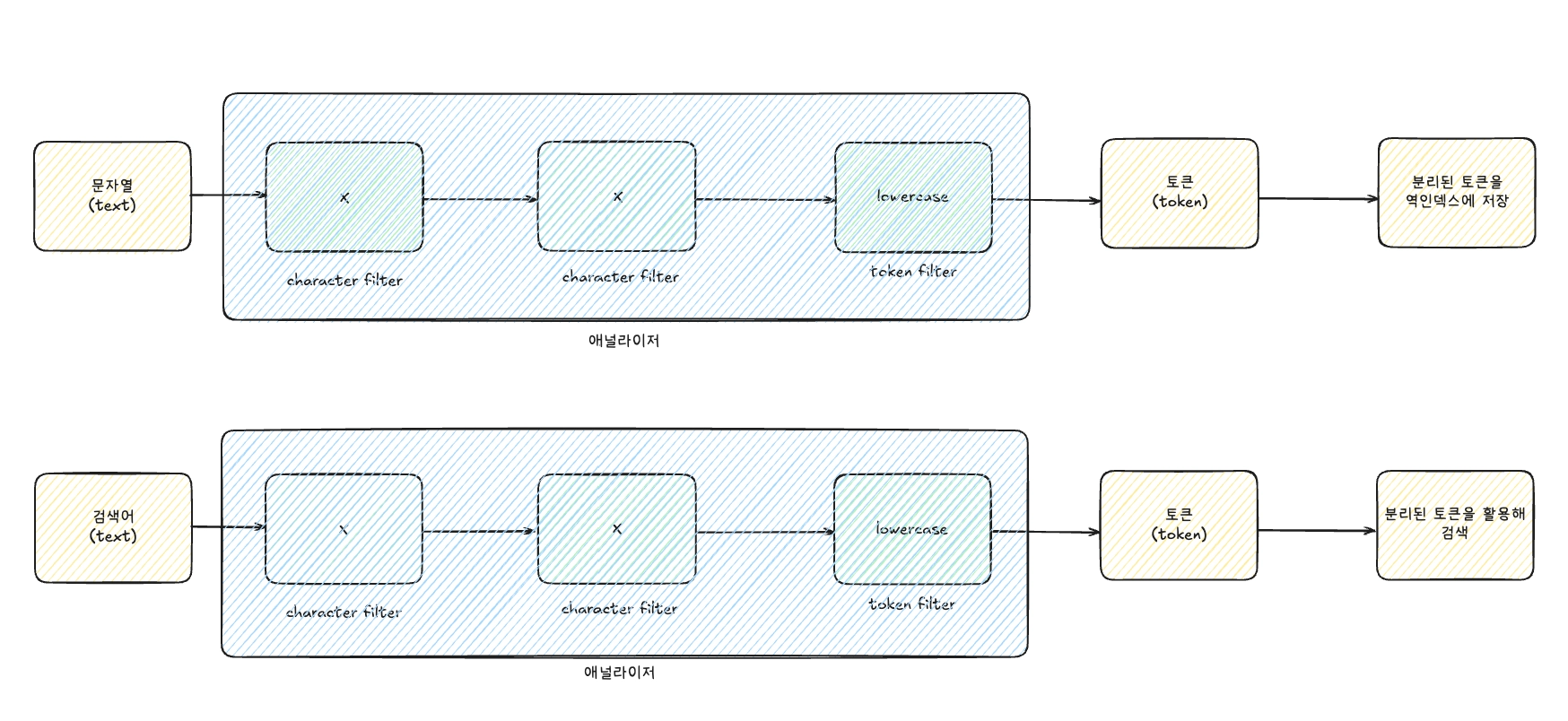
이 때문에 jumped이라고 검색어를 입력하더라도 stemmer에 의해 jump로 바뀐 채로 검색을 하게 된다. 그래서 jumped라고 검색했는데도 불구하고 도큐먼트가 조회
Nori Analyzer를 활용해 한글(korean)이 제대로 검색되게 만들기
// 방법 1
GET /_analyze
{
"text": "백화점에서 쇼핑을 하다가 친구를 만났다.",
"analyzer": "nori"
}
// 방법 2 (nori analyzer의 구성을 직접 명시)
GET /_analyze
{
"text": "백화점에서 쇼핑을 하다가 친구를 만났다.",
"char_filter": [],
"tokenizer": "nori_tokenizer",
"filter": ["nori_part_of_speech", "nori_readingform", "lowercase"]
}
JSON
복사
•
nori_part_of_speech : 의미 없는 조사(을, 의 등), 접속사 등을 제거
•
nori_readingform : 한자를 한글로 바꿔서 토큰으로 저장
한글(korean)과 영어(english)가 섞인 글을 검색 가능하게 만들기
•
stop, stemmer를 쓰니 불용어가 제거되고 영단어가 기본 형태
GET /_analyze
{
"text": "오늘 영어 책에서 'It depends on the results.'이라는 문구를 봤다.",
"char_filter": [],
"tokenizer": "nori_tokenizer",
"filter": ["nori_part_of_speech", "nori_readingform", "lowercase", "stop", "stemmer"]
}
JSON
복사
즉 역색인을 위해 데이터를 미리 만들때 애널라이저를 사용해서 구성하며, 이때 사용자가 어떤 애널라이저를 적용할지 선택하여 자신의 서비스에 맞게 설정해야 될 것으로 보입니다.
검색시에도 정의해놓은 애널라이저를 사용해서 검색하기 때문에, 이것또한 같이 고려해야 됩니다.